
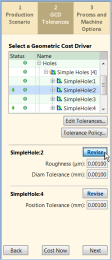
Use the GCD Tolerances tab to set either an overall tolerance policy for the component, or specific tolerance overrides for GCDs.
-
To set a tolerance policy for the component overall, click the Tolerance Policy… button. For more information, see Using the Tolerance Policy Editor.
-
To specify tolerance and roughness requirements for a GCD, first select the GCD and then click the Edit Tolerances button. For more information, see Specifying or importing tolerance and roughness values.
When using this Cost Guide tab, note the following:
-
The Tolerance Policy button is always enabled. The Edit Tolerances button is enabled when you have selected a GCD that can accept a tolerance setting.
-
There is some interaction between the Cost Guide tab and the Geometric Cost Drivers panel. Depending on the object, when you select or act upon something in one panel is reflected in the other.
-
For more GCD details, you can switch to the Geometric Cost Drivers panel and display the GCD Properties table to its right.
-
When you edit the tolerance values for a GCD, each override is listed at the bottom of the Cost Guide, along with a Revise button.

When you are finished with the GCD Tolerances tab, you click the Cost Now button or move to another Cost Guide tab by clicking the Next button at the bottom of the Cost Guide or by clicking the Process and Machine Options tab at the top of the Cost Guide.